

Skills: how much it does alone
The three rungs, every job on the ladder, the three marked hard to undo, and the order that actually works when you are moving one up.
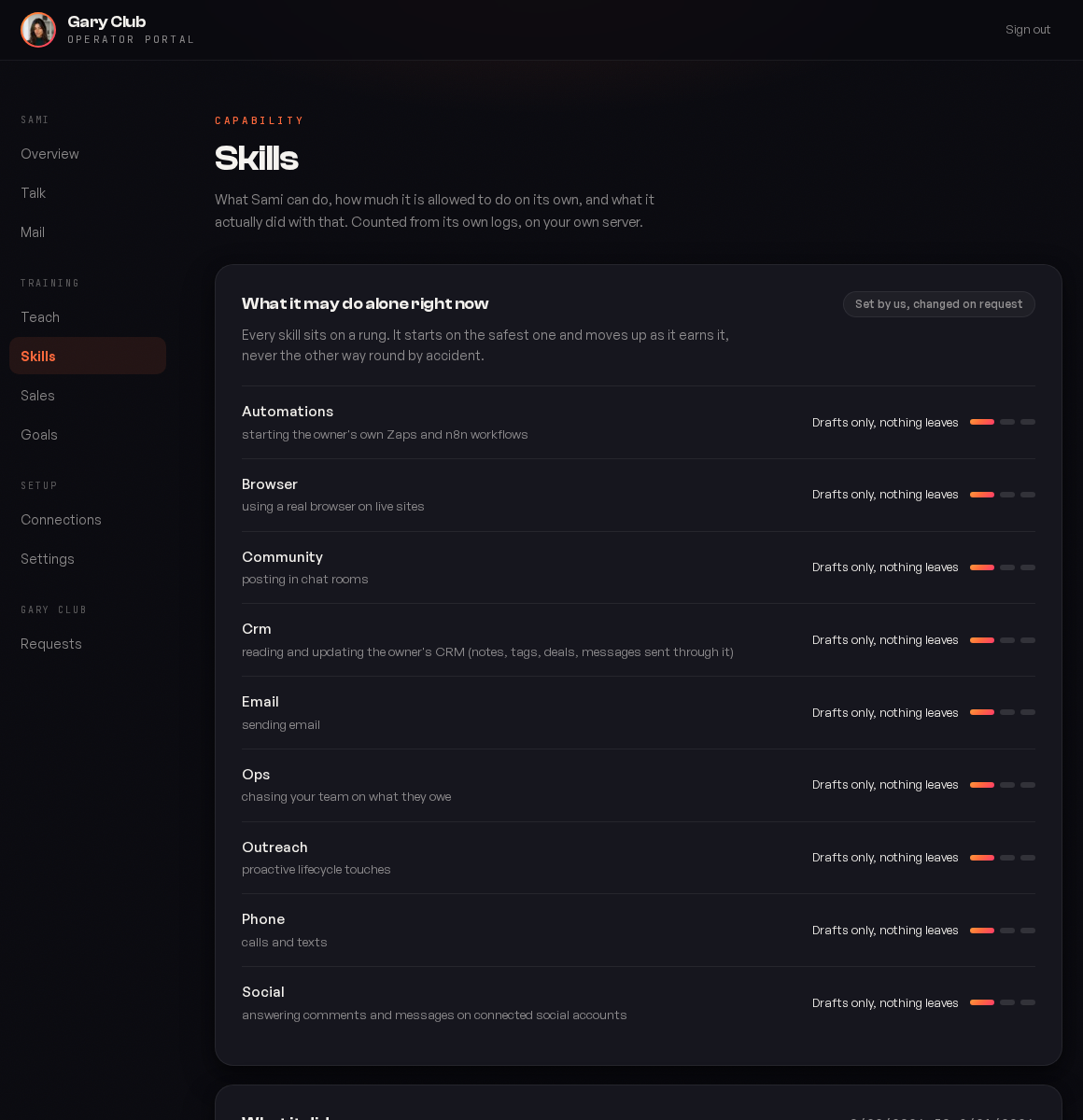
Skills is the most important screen in your portal. It answers one question for every job your operator can do: how much is it allowed to do without asking you?
It is also the screen you will visit most in the first month, because the whole shape of this product is that your operator starts with its hands tied and earns its way up, one job at a time, at whatever pace you are comfortable with.
The three rungs
Every capability sits on the same ladder. There are only three rungs and they mean the same thing for every job.
| Rung | What the screen says | What actually happens |
|---|---|---|
| Shadow | Drafts only, nothing leaves | It does the entire job and shows you the result. The email is written, the reply is composed, the automation payload is prepared. Nothing is sent, posted, called or started. |
| Assisted | Asks you first | It prepares the action and waits. A person approves each one individually. Approving is not a blanket yes; it covers that single action. |
| Autonomous | Goes ahead | It acts on its own, inside whatever limits that job carries. You still see everything it did. |
The rungs are per job, not global. Autonomous email with shadow phone is a completely normal configuration, and most clients end up somewhere mixed rather than all the way up or all the way down.
The order that works. Leave everything in shadow for the first week and read what it drafts. You are not testing whether it can write; you are learning where its judgement differs from yours. Move the job you have read the most of first, and move it to assisted rather than straight to autonomous.
Every job on the ladder
Nine capabilities today. Each one is a different kind of exposure, which is why they are separate rather than one master switch.
| Job | What it covers | What it can reach |
|---|---|---|
| Sending email | Anyone your operator has a reason to write to: a prospect who replied, a customer asking a question, a thread it was brought into. | |
| Phone | Calls and texts | Outbound calls and SMS on your own number. Marked hard to undo. |
| Crm | Reading and updating your CRM | Notes, tags, deals, and messages sent through the CRM itself. |
| Community | Posting in chat rooms | Whichever Slack or chat channels it has been invited to. |
| Social | Comments and messages | Replies on the social accounts you connected. |
| Outreach | Proactive lifecycle touches | The follow ups nobody asked it for: a prospect going quiet, a renewal approaching. |
| Ops | Chasing your team | Your own staff, on what they owe. Internal, not customer facing. |
| Browser | Using a real browser on live sites | Anything it can reach while signed in as you. Marked hard to undo. |
| Automations | Starting your own Zaps and n8n workflows | Whatever those automations do. Marked hard to undo. |
The three marked hard to undo
Browser, Phone and Automations carry a warning, and it is worth reading twice before agreeing to it once.
Browser
It clicks real buttons in real accounts while signed in as you. A form submitted is submitted.
Phone
A call happens in the world. You cannot recall it, and the person on the other end remembers it.
Automations
The most open ended of the three, for a reason that is worth understanding: we do not know what your automation does. Every other job on this list is something we built and can describe to you. This one is a door into work you wrote, and behind it could be an invoice, a booking, a charge or a message to a customer.
None of these are forbidden from running autonomously. That is your call and plenty of clients make it. They are flagged because it can click things in your billing portal unsupervised deserves a moment's thought, and because a flag you have to dismiss is better than a surprise you have to explain.
It fails closed, always
If the setting cannot be read, is missing, is a value we do not recognise, or belongs to a job nobody has configured yet, it resolves to shadow.
The failure mode is always it asks first, never it went ahead. That holds through a corrupt config file, a half finished upgrade, and a capability that shipped after your operator was built. It is the one behaviour in this product we would rather be annoying than clever about.
This is why a brand new capability appears on your Skills page already switched off rather than already running. When we shipped the Automations rung, it arrived on every operator in shadow, including for clients who had already moved other jobs to autonomous.
What it actually did
Underneath the ladder, the same screen shows what your operator did with the rope it has. Counted from its own logs, on your own server, not from anything we keep.
Read the two together. A job sitting in autonomous with almost no activity usually means a connection is missing rather than that there was no work. A job in shadow with a lot of activity is the one you are ready to promote.
Moving a job
Read a week of its drafts
In shadow it is doing the work already. Judge the work, not the promise.
Move it one rung
Shadow to assisted. Not shadow to autonomous, even when you are confident: assisted costs you a click and buys you the sight of a dozen more real actions.
Watch what you approve
If you are approving everything without reading, that is your signal to go to autonomous. If you are editing before approving, stay where you are and use Teach to fix the pattern.
Move it again when it is boring
The right moment to go autonomous is when approving has stopped being interesting.
An owner makes the change. Team members can see the ladder but not move it. A change takes effect within about fifteen minutes, and you can always ask your operator directly: what are you allowed to send on your own right now? It will tell you plainly, including the jobs still in shadow.
Common questions
It can email people it has a reason to write to: someone who replied, a thread it is part of, a customer with an open question. It does not have a list of your contacts to blast, and cold outreach is a different job that is not on this ladder.
No. The rung changes whether it waits for you, not whether you can see what happened. Everything it did is still on this screen and you can still ask it directly.
It stays a draft. Nothing is sent by timeout. If a draft sat there because you were away, your operator will usually raise it rather than quietly dropping it.
Yes, any time, and it takes effect on the same fifteen minute cycle. Moving down is the normal response to one bad week and nobody will ask you to justify it.
Because the ladder is the whole safety model. Seeing it helps everyone understand what to expect; changing it is an owner decision.
Was this page helpful?