

Connections: wiring in your own tools
What it can do today, the six groups, connected versus delivered, bringing your own key, and holding several of the same app.
Connections is where you wire your operator into the systems your business already runs on. Every one is optional, and your operator works without any of them: what each connection buys is the ability to do that job in your account rather than in ours.
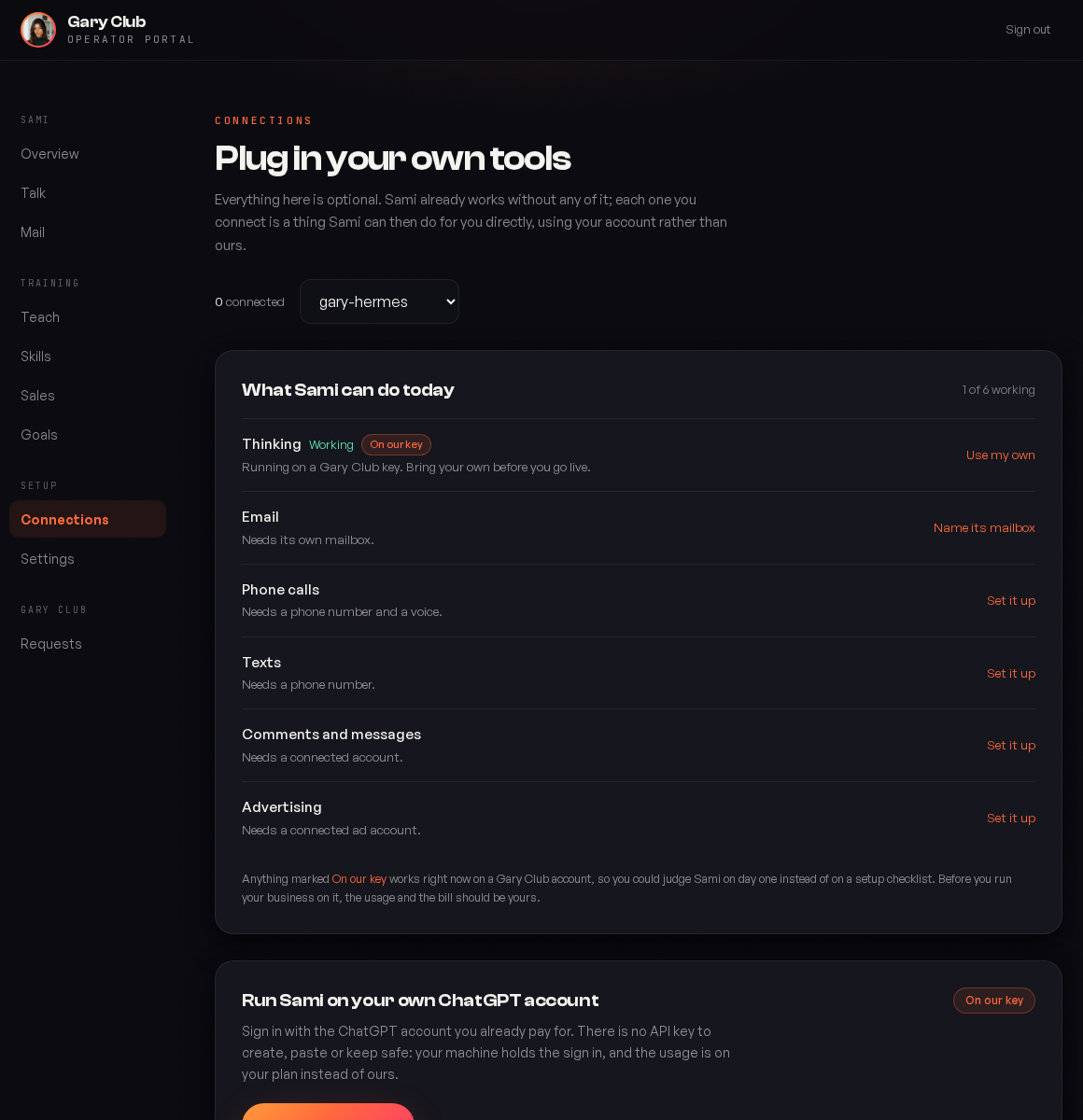
Start here: what it can do today
The first card is the one to read before anything else. It lists each capability with one of three states, and it is the shortest path to understanding why something is not working.
| State | Meaning | Your move |
|---|---|---|
| Working, On our key | It works right now, on a Gary Club account. You can judge your operator on day one instead of on a setup checklist. | Nothing urgent. Bring your own before you run the business on it. |
| Working | Running on your own connection. | Nothing. |
| Needs its own mailbox / Needs a phone number / Needs a connected account | The capability exists but has nothing to act through. | Follow the link on that row. |
On our key is a real state, not a broken one. It is there so a new client can watch their operator think, write and answer on day one rather than staring at a list of API keys. Before you run your business on it, move the usage and the bill to your own account.
The groups, and why they are grouped this way
Connections are grouped by what the tool does for your operator rather than by vendor, because the decision you are making is about a capability.
| Group | What it is | How many |
|---|---|---|
| Its brain | Where it does the thinking. | Pick one. OpenRouter reaches every major model through a single key, or connect a provider directly if you already have an account. |
| Voice and eyes | Speaking, listening, avatar video. | As many as you need. These do different jobs. |
| How it reaches people | Phone, text and email on your own numbers and your own registration. | As many as you need. |
| Where your business runs | CRM, calendar, support desk, call recorder. This is what turns a capable operator into one that knows your customers. | As many as you need, and often several of the same one. |
| What you have already automated | Your Zaps and n8n workflows, both directions. | See Zapier and n8n. |
| What it reads | Infrastructure it can look at to answer questions about your own systems. | As many as you need. |
The brain is one decision with several answers, not a list of chores. Connecting OpenRouter and Anthropic and OpenAI does not make it three times as clever; it just means two of them sit unused. Pick the one whose account you want the bill on.
Connected, delivered, and why we use two words
The page is careful about this because the difference is the difference between a check we did and a check we did not.
| Word | What we actually know |
|---|---|
| Connected | We asked the vendor with your credential and the vendor said yes. The key works. |
| Delivered | We hold the credential and have sent it to your server. There was no safe way to test it. |
Zapier is the clearest case of the second. The only way to test a Catch Hook is to post to it, and posting to it runs the Zap. A connection test that emails your customer is not a test, so we say the weaker, truer word.
When a check does run and fails, you find out immediately rather than the first time something needs it. A wrong GoHighLevel token tells you it is wrong at the moment you paste it, and it tells you whether the problem is the token or the Location ID, because those are different fixes.
Adding a connection
Find the app in its group
Each row says where to get the credential in that vendor's own words, down to the menu path. You should not need to search their docs.
Create the credential in the vendor, scoped down
Most vendors let you make a key narrower than your whole account. Take that option. A restricted Stripe key and a scoped Cloudflare token do the same work with far less exposure.
Give the connection a name
Required, and it matters more than it looks. Once a key is saved it is never shown again, so the name is the only thing telling two of them apart six months from now.
Paste and save
Where we can verify it, we do, before saying it is connected.
More than one of the same app
Plural is the normal case rather than the exception, so most apps hold several named connections:
| Case | Why |
|---|---|
| Two GoHighLevel sub accounts | One client works inside their own CRM and inside a partner's white labelled one. |
| A call recorder key per closer | A Fathom key is scoped to the person who owns it and reaches only their recordings. Three closers is three keys, and that is the correct arrangement rather than a workaround. |
| One Zap per job | Zapier publishes no way to list your Zaps, so each one is connected by its own address. |
Name these after the person or the purpose, never after the tool. Franzi and Speak To Freedom will still mean something next year. GHL 2 will not.
Bringing your own key, and why
Three reasons, in the order clients usually care about them:
The bill is yours and it is usually cheaper
At any real volume, your own account costs less than a share of ours, and you can see exactly what you spent.
You can revoke it without asking us
It is your credential in your vendor account. Turning it off is one click on your side, at any hour, without a support ticket.
Your usage is not pooled
Rate limits, quotas and history are yours alone. Nobody else's busy Tuesday is your slow Tuesday.
Disconnecting
Disconnecting revokes the credential here and tells your server to stop holding it. Your operator then reports that it is waiting on that tool rather than behaving as though the integration never existed.
That distinction is deliberate. An operator that says I am waiting on your CRM key is telling you something you can fix. One that silently behaves as though you never had a CRM is not.
Common questions
No, and neither can we. Credentials are encrypted at rest and never shown again on any screen. If you need to know whether one still works, reconnect it and let the check answer.
Owners. Team members can see the page and what is connected, but the credentials and the disconnect button are owner only.
The old one stops working, so reconnect with the new one. Where we verify, the page will show the failure rather than pretending it is fine.
No. Connecting gives it the ability; Skills decides how much of that it may do without asking you. A freshly connected CRM sits behind the same ladder as everything else.
Some accounts run more than one operator, and each has its own connections. The selector picks which one you are configuring; nothing is shared between them.
Was this page helpful?