

How To Lock Tokens With JUP
Lock your $GARY on Solana with Jupiter Lock — set a cliff date, a vesting schedule, and claim rules. Step-by-step.
Jupiter Lock is a free, open-source, audited tool that locks SPL tokens on Solana and releases them on a schedule you choose. It's the cleanest way to lock your $GARY for a set period — you stay the owner the whole time; the tokens just can't move until the date you pick.
You use Jupiter Lock directly at lock.jup.ag. This is a Jupiter tool — Gary Club never holds your tokens in this flow. The lock is an on-chain contract between you and the Jupiter Lock program.
Before you start
- A Solana wallet (Phantom, Solflare, Backpack, …) holding the $GARY you want to lock.
- A little SOL in that wallet to cover the network fee (a few cents).
- The $GARY mint address, so you select the right token:
8c71AvjQeKKeWRe8jtTGG1bJ2WiYXQdbjqFbUfhHgSVk
Don't own $GARY yet? Start with How to buy $GARY.
Create the lock
- Open lock.jup.ag and connect your wallet (top right).
- Click Create Lock.
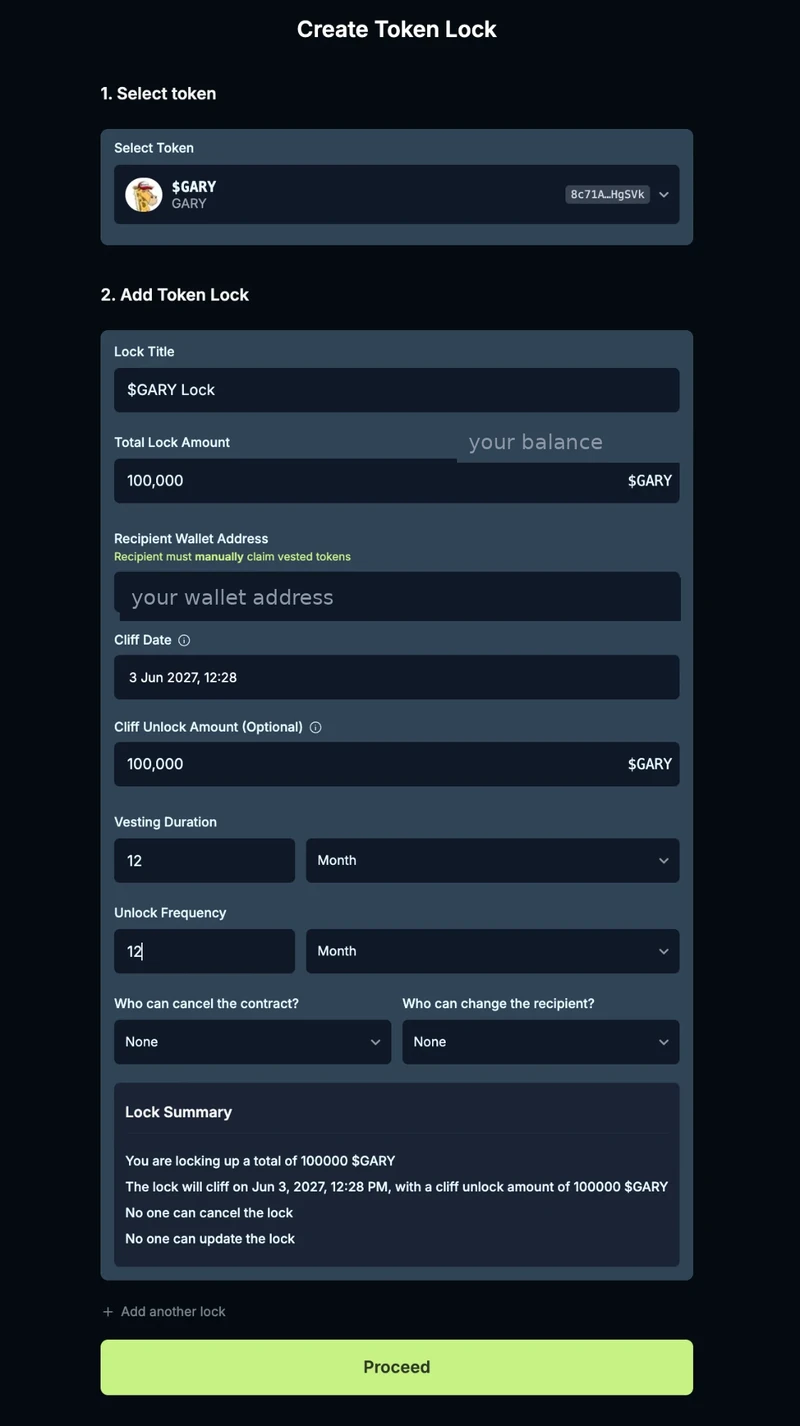
- Select token — paste the $GARY mint and confirm the name shows as $GARY:
8c71AvjQeKKeWRe8jtTGG1bJ2WiYXQdbjqFbUfhHgSVk - Lock Title — a label for your own reference, e.g. $GARY Lock.
- Total Lock Amount — how many $GARY to lock. Must be at or below your wallet balance.
- Recipient Wallet Address — who can claim the tokens as they unlock. To lock your own tokens, paste your own wallet address here. The recipient must manually claim — tokens are never sent automatically.
- Cliff Date — the date before which nothing can be claimed. For a one-year lock, set this exactly one year out.
- Cliff Unlock Amount (optional) — how much unlocks in a single step on the cliff date. Set it equal to the Total Lock Amount if you want everything to unlock at once when the cliff hits.
- Vesting Duration — the period over which anything left after the cliff releases gradually (e.g. 12 Months).
- Unlock Frequency — how often a release happens during the vesting duration (every 1 Month = monthly; every 12 Months = a single release).
- Who can cancel the contract? — choose None to make the lock permanent, so no one (not even you) can end it early.
- Who can change the recipient? — choose None to fix the recipient for good.
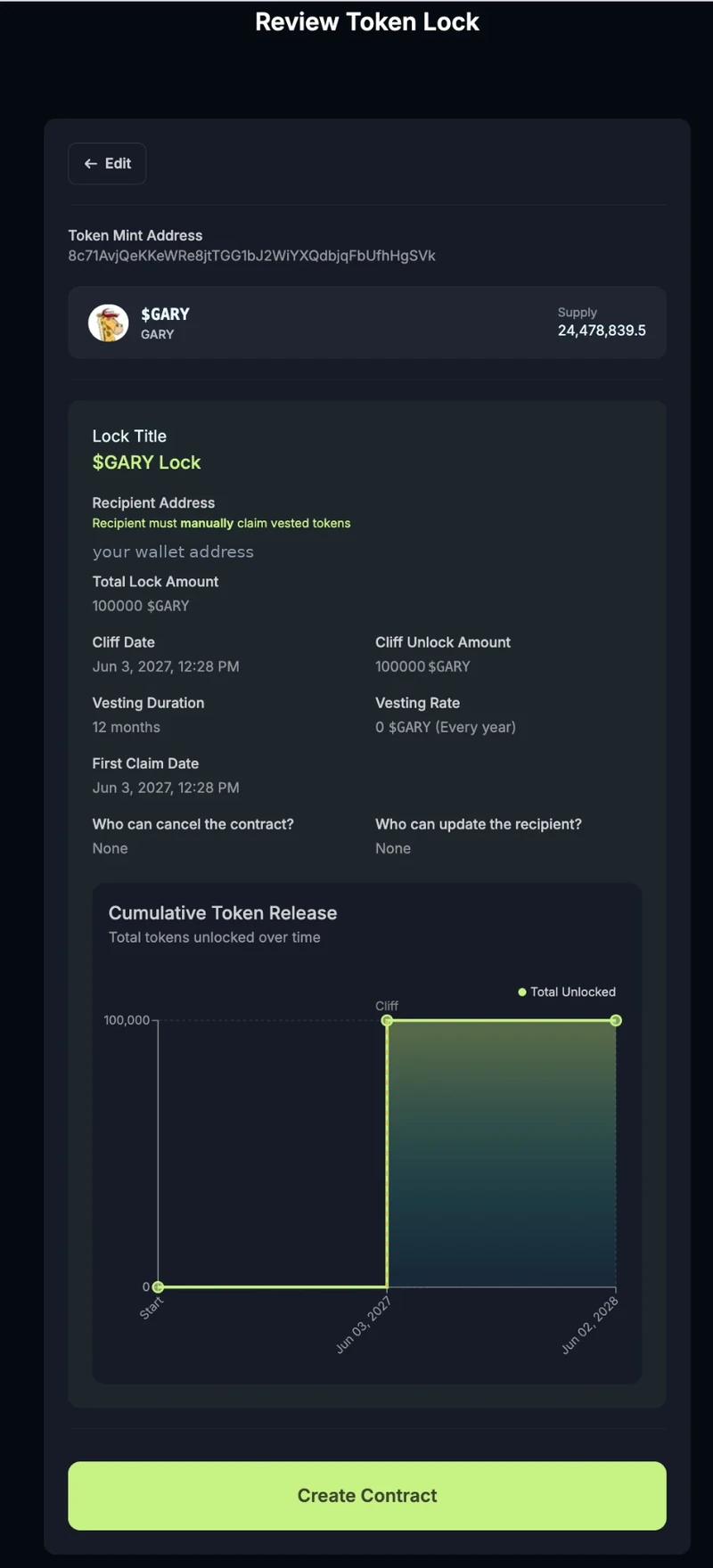
- Review the Lock Summary, click Proceed, check the release schedule on the next screen, then click Create Contract and approve in your wallet.
Cliff vs vesting — how tokens release
Two settings decide when locked tokens become claimable:
- Cliff unlock — a single chunk (the Cliff Unlock Amount) becomes claimable all at once on the Cliff Date.
- Vesting — whatever remains after the cliff unlock releases gradually across the Vesting Duration, one slice at each Unlock Frequency interval.
Use either or both. The two common shapes:
- Straight one-year lock — set the Cliff Date one year out and the Cliff Unlock Amount equal to the Total Lock Amount. Nothing is claimable for a year; on the cliff date the whole amount unlocks at once. (Because everything unlocks at the cliff, the vesting rate shows as 0 — there's nothing left to drip out.)
- Gradual vest — leave the Cliff Unlock Amount at 0 and let the full amount release over the Vesting Duration at your chosen Unlock Frequency.
Example — lock $GARY for one year
- Total Lock Amount: the amount you're locking
- Recipient: your own wallet
- Cliff Date: one year from today
- Cliff Unlock Amount: the same as the Total Lock Amount (so it all unlocks at the cliff)
- Vesting Duration: 12 Months · Unlock Frequency: 12 Months
- Who can cancel / change recipient: None / None
Result: the tokens are locked and unclaimable for a year. On the cliff date the full amount becomes claimable in one go, and the first claim date equals your cliff date.
Claiming your tokens
Unlocked tokens are not sent to you automatically — the recipient claims them:
- Go to lock.jup.ag and connect the recipient wallet.
- Open your lock in the list of locks you're receiving.
- Click Claim on whatever has unlocked. The tokens land in the recipient wallet.
There's no deadline — anything unlocked simply waits in the contract until you claim it.
Field reference
| Field | What it does |
|---|---|
| Select token | The token to lock — paste the $GARY mint. |
| Lock Title | A label for your own reference. Cosmetic. |
| Total Lock Amount | How many tokens to lock (at or below your balance). |
| Recipient Wallet Address | Who can claim the tokens as they unlock — your own wallet for a self-lock. |
| Cliff Date | The date before which nothing can be claimed. |
| Cliff Unlock Amount | Amount that unlocks in one step on the cliff date. Optional. |
| Vesting Duration | The period over which post-cliff tokens release. |
| Unlock Frequency | How often a vesting release happens. |
| Who can cancel the contract? | None = permanent. Or let the creator / recipient cancel early. |
| Who can change the recipient? | None = the recipient is fixed forever. |
Watch out for
- None / None means permanent. If nobody can cancel and nobody can change the recipient, there's no undo — the tokens stay locked until they unlock on schedule. Double-check your amount and dates before you confirm.
- The recipient address is final when "change recipient" is None. Triple-check the wallet you paste — claims go there and nowhere else.
- Keep a little SOL in the wallet that creates the lock and in the recipient wallet that claims.
- Only ever use lock.jup.ag. Jupiter Lock is open-source and audited (OtterSec and Sec3), program
LocpQgucEQHbqNABEYvBvwoxCPsSbG91A1QaQhQQqjn. Never create a lock from a link someone DMs you.
Was this page helpful?